COMPASS
Tour design
Property tours are crucial to the Buy-side workflow - the majority of home purchases require a buyer to tour several properties with an agent over an extended period of time. To meet current touring needs, agents used a variety of software solutions (eg MLS, ShowingTime) across many platforms, including competitor products. We wanted to integrate all these features within the Compass product so that agents (and their clients) could seamlessly schedule, organize, and prepare for property visits without leaving the Compass platform.
Role
UX Designer
Category
Mobile
Timeline
3 month
My Role
The redesign of Tour was a team effort that challenged user research, design, technology, and agent marketing teams to reinvent what a good tour experience could be. I was responsible for the end-to-end design which focuses on our mobile agents' needs and an easier, more complete tour workflow.
Current State
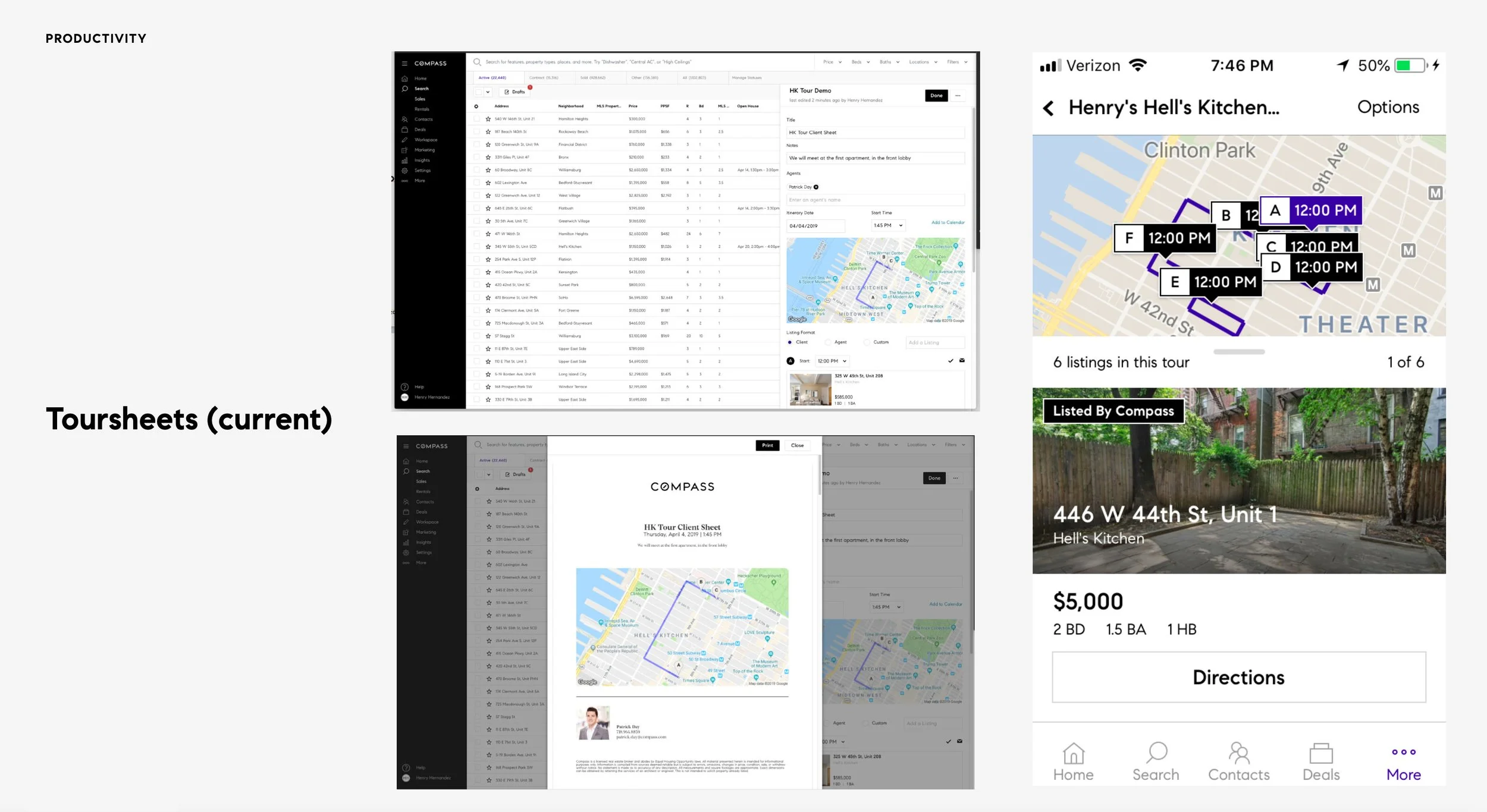
Compass Tours existed before as an ordering tool with PDF export capability on web and mobile. This was not a digital-forward solution, but also left a lot of churn on the Agent and Client to quantify feelings and progress on listings.
Problems
We identified current toursheets usage was low:
Tour scheduling was incredibly time consuming for agents. Agents needed to use a variety of tools to arrange and organize their tours.
There was no easy way to collaborate on a tour between agents and clients if it had been scheduled through the Compass platform, especially on mobile.
Solution
Provide feature parity between Compass and other tools, and decrease the time of data entry and switching tools.
Mobile design first: enable both agents and clients to be able to access/update/share a tour from the mobile app or from mobile browser.
Questions
What tasks did they need to complete in setting a tour and what tools did they currently use to solve the problem?
How could we provide clear enough value to agent to cause a switch in behavior?
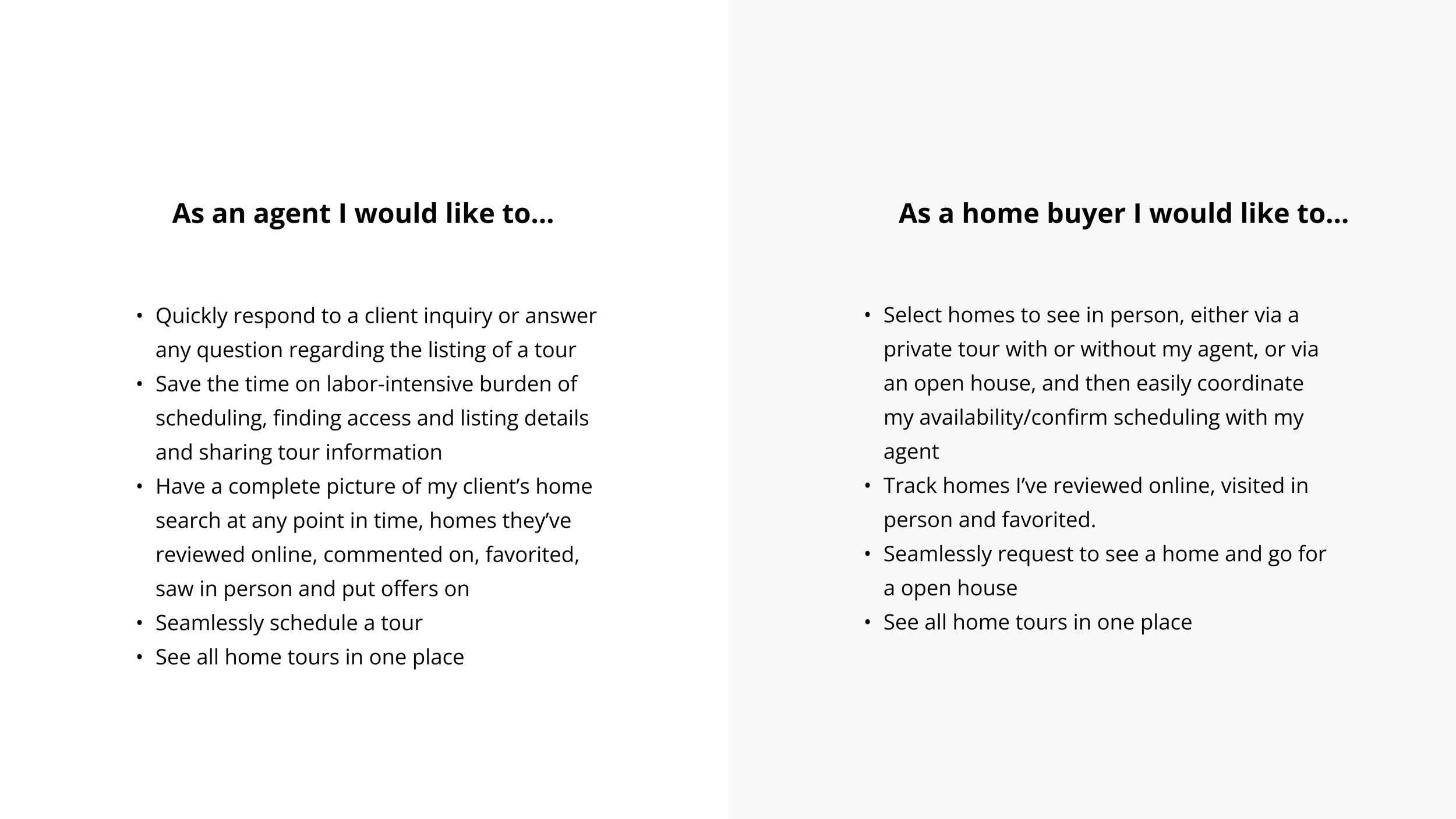
Agent research and client goals
Our user researcher mapped the user tasks and mental map for buyer agents by interviewing 10 agents in 10 different regions in America. As the research was done before I joined the company, I found out we were lacking research on clients' (buyers) behavior and requirements which could also be very important as they were also part of the audience for this feature. I added the goals from the clients’ perspective, making sure we considered them in both design and future testing.
- See more details in design process.
Where we landed
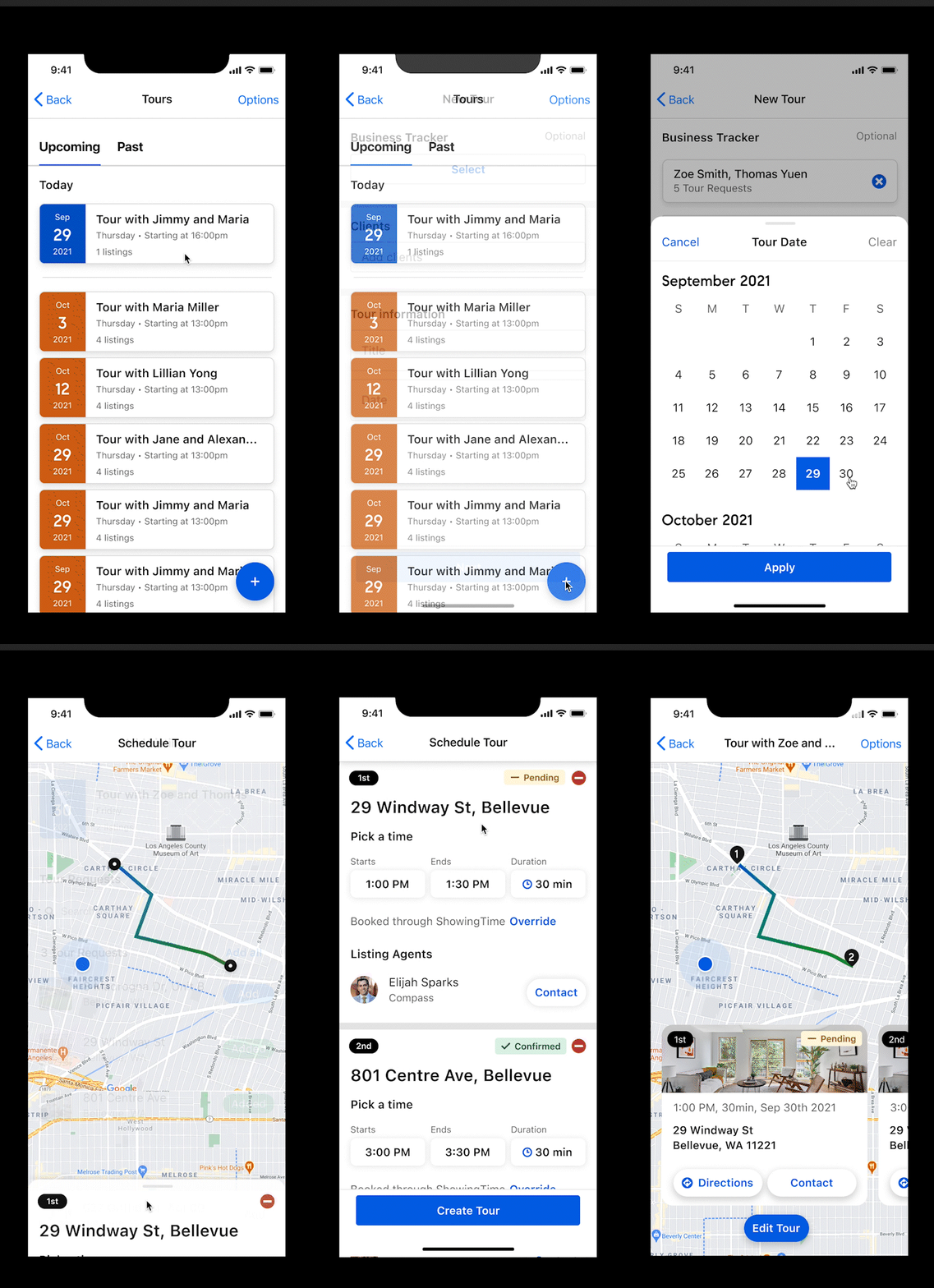
Create a new tour
Design Process
See the details of how we get here
Find Insights from research
Based on the previous user research document,
detailed Agent tour journey and requirements at each stage were provided
no significant differences in tour requirements between agents from different areas, or different types of tours were found
it was not clear what would be the motivators to drive agents to use compass other than the others
Given this research summary, we (me and PM) decided to start with creating a user need statement and prioritize the requirements based on insights we got from the agent tour journey and interview reports.

Prioritization given technical constraints:
We did not seek to define problems and solutions from the lens of what it currently supports, but by the time when we moved to work on the actual product strategy and design plan, we had to prioritize the problems by also considering our technical constraints.
Prioritization with more data analysis:
During our analysis, It was pretty obvious that scheduling and accessing to listing information were very important for buyer agents when they needed to set up a tour. By leveraging old Toursheets data, I found that the most popular feature in Toursheets was sharing, which had about 80% usage in past 30 days. Branding was another missing part that was needed to be added on to the list by our product marketing manager.
Prioritization tiers:
Tier 1
-
In order to set up a tour, agents must geographically map all properties to view, easily move listings around to organize, and interact with listing agents (ShowingTime) to confirm appointments. None are easily achievable on the Tours product today, but all are foundational actions when scheduling a property visit.
-
Agents need to be able to quickly share a Toursheet with a client to provide context for the upcoming tour. For the client, the Toursheet needs to facilitate easy browsing of photos and details for each listing they will be touring.
-
During a tour, agents need all listing information on-hand to help answer client questions. Agents need to present themselves as the residential expert and cannot accomplish this with the information provided on Toursheets today.
-
The Compass-created Toursheet is a branding moment and an opportunity for the agent to visually demonstrate their value and commitment to the client.
Tier 2
-
We will have a basic client version with the access to their agent tour page, but no authorize to edit the tour
-
Agents on-the-go need simpler solutions to schedule appointments via phone, to listing agents on or off ShowingTime.
-
Lockbox information is mainly on Showing Time and MLS. We leave this on tier 2 till we integrate Showing Time.
Tier 3
-
Agents and clients both need a way to save thoughts and opinions during a property tour. This helps narrow down the buyside search to ultimately align everyone on a home.
Ideation
We decided to scope our Phase I to be :
Focusing on (agent) mobile solutions first.
Allowing agents to accomplish basic tasks in scheduling tours - (Tier 1 tasks)
I sketched different options of how we envisioned the main tour workflow will be, and subsequently, the other sub workflows from other entry points such as using tour or adding a listing to a tour.
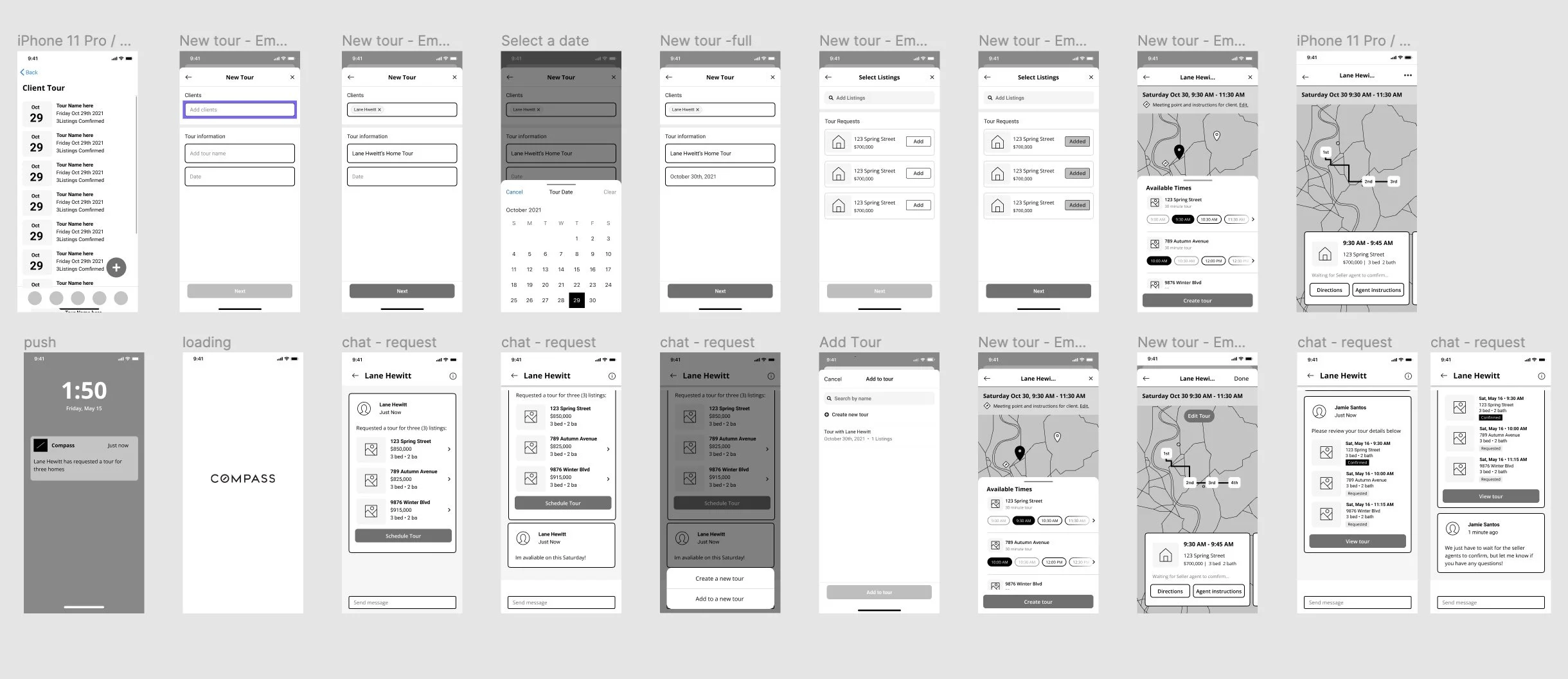
The goal of my low fidelity prototype was to test the flow of a design solution and gather feedbacks from the internal team to make sure everyone was on the same page of the idea and the scope of the project. Once the team was all on the same page of the flow, I moved on to high fidelity wireframes for user testing.
Insights from prototype testing
Identifying impact insights - keys to cause a switch in behavior
I tested with 8 agents with 6 of them said they didn’t find this tool having a big impact on their current tour workflow.
Based on the feedback I gathered 3 issues to address
Agents could not schedule a tour as easy as they could currently do on Showing time app
Agents could not get easy access to lockbox information and listing agent instructions.
Agents could not see travel time between listings and could not add a meet point within tour route, which they could easily do on google map
Currently, the user was using Showing time app or Google Maps to solve these problems. Since it was not realistic to develop the full functions of either of them on our platform in a short time, I started to think about how to design a tour product that could connect with these two apps to easily transfer data.
How we got there
Improve tour home page design for easier tour finding experience
Color-coded tour cards based on date
Added Past Tour tab
Improved tour card design

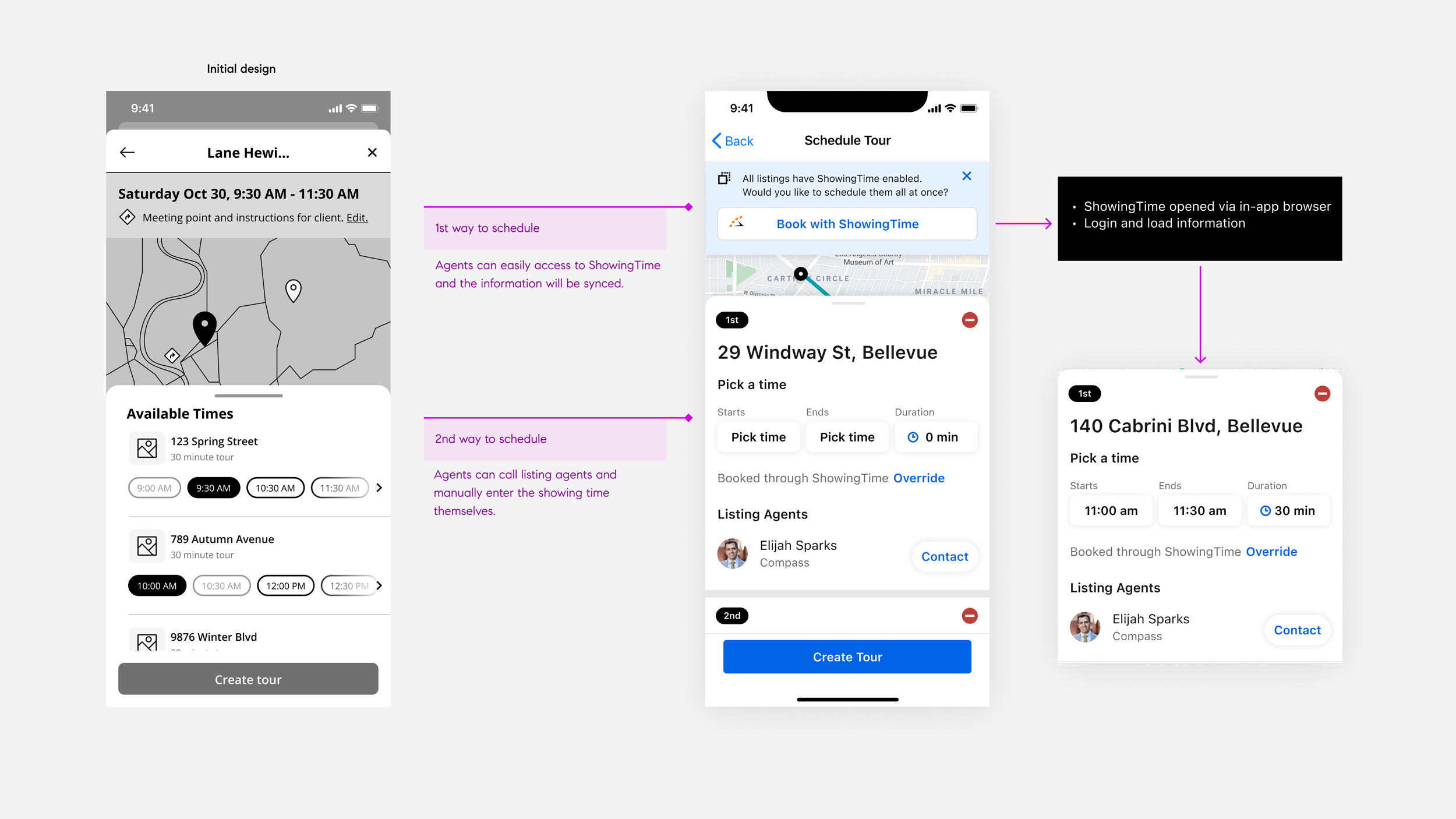
2. Allow users to schedule tours by ShowingTime app (1-click) or direct contact with the listing agent.
In a lot of areas, listing agents liked to use ShowingTime to setup and share their showing time availability and instructions, as this app is connected with MLS. In addition to be able to contact agents directly, we decided to integrate new a feature on our platform so that agents could perform 1-click to open ShowingTime app to book showing there and the showing information would be automatically synced to our platform.
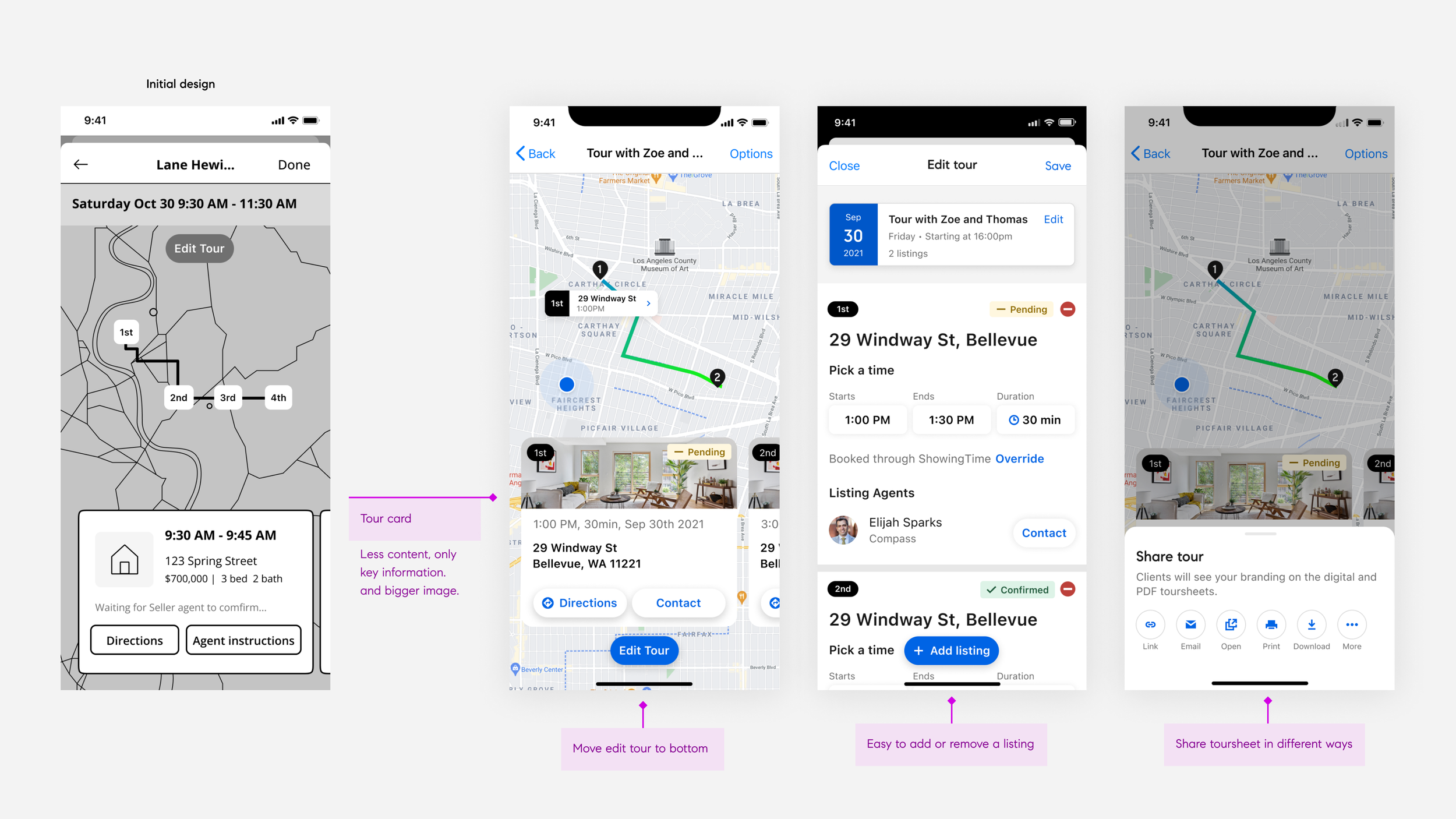
3. Auto-generate tour route based on the listings’ showing time and provide easy access to Google Maps
We provided the best direct route for the tour based on the showing time schedule. On tour day, agents and clients could easily get the directions from Google Maps without manually entering the addresses and also edit/share tour.
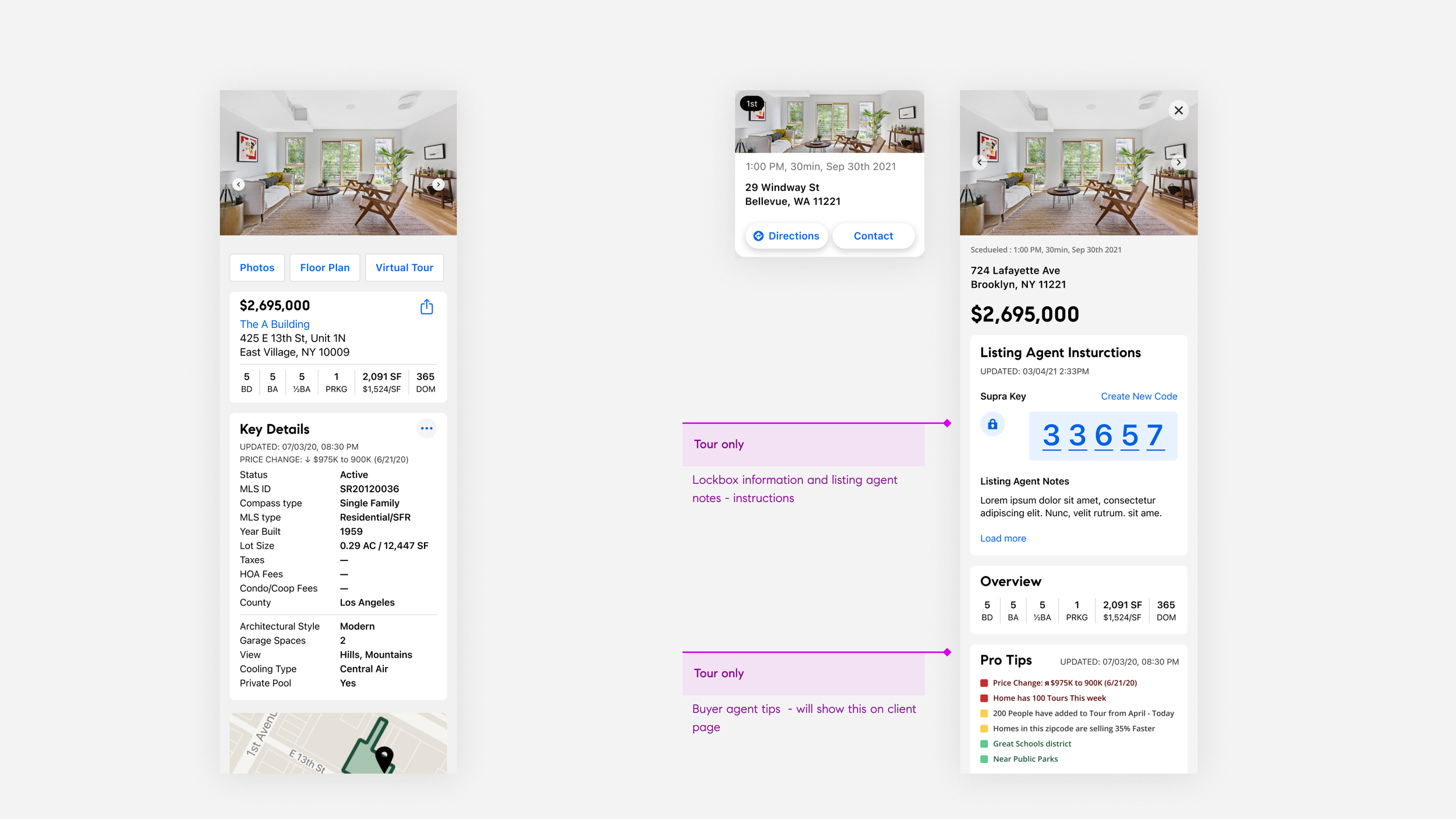
4. Add tour only details including lockbox information
Agents would be able to see instructions and lockbox information provided by the listing agent. Our agents could also write notes about the tour listings which would be synced to the client tour listing page automatically.
How we measure success?
% of Buy-side agents that have an active tour (last 3, 7, 30 days)
% of Buy-side agents that have made 5+ appointment requests via Compass Platform (last 3, 7, 30 days)
Drop-rate, % of Buy-side agent did not add a time for the tour( or did not click anything after they create a tour)